
Your AI records
the video.
In your own Chrome, while you watch.
Tell Claude or ChatGPT what to show. It clicks, types and scrolls like a person, speaks the voiceover, and hands you a finished clip with captions and chapters.
 Claude
 ChatGPT
- Claude Code
- Any MCP app
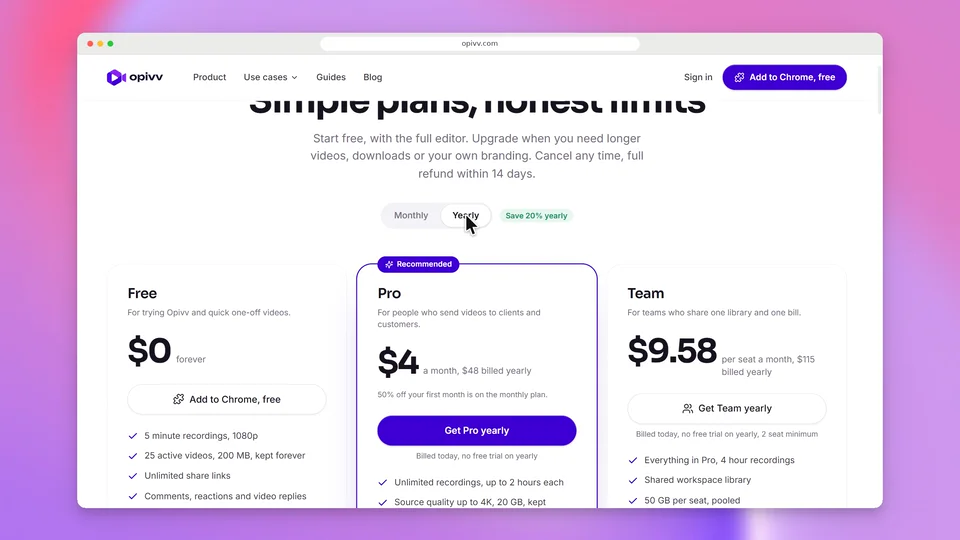
You asked“Make a 30 second tour of our pricing page with a voiceover. Point out the yearly discount and the free trial.”
From one sentence to a finished demo
Three steps, and you only do the first.
- Your AI assistantOpivv connected
Make a 30 second tour of our pricing page with a voiceover. Point out the yearly discount and the free trial.
I looked at the page first. Recording it now.
Ask in plain words
Say which site or app to show, what to click and what to say. Your AI looks at the page first, so it names each button by the words on it.
record_websiteopivv.com/pricing- Close the cookie banner
- Click YearlyYearly saves 20%
- Click MonthlyFree trial
- Scroll to Compare every feature
- Scroll to Pricing questions
Voiceover by hannah, 5 linesIt films in your Chrome
The Opivv extension opens a separate window and does the steps like a person: the pointer moves, clicks, types and scrolls, and each step waits for its line of voiceover. Watch it, take over, or stop it at any moment.
You get a finished clip
It lands in your library as a private video with the Studio look, captions and chapters. Share it when you are ready, or edit it like any recording.
Everything a demo needs, done for you
You write what to say. The voice, the framing and the captions are taken care of.
Six voices, or your own
Write a line for each step. Pick one of six voices or record a short sample and it speaks as you, and tell it how to say your brand name.
- hannah
- diana
- autumn
- troy
- austin
- daniel
- Your own voice
Phone, square or widescreen
Record the mobile site upright for Shorts and Reels, square for feeds, or 1080p for YouTube. Dark mode too.
- Shorts and ReelsPhone1080× by 1920
- FeedsSquare1080× by 1080
- YouTubeWidescreen1920× by 1080
Captions spelled right
The transcript is the script itself, timed to the speech, so your product name is never misheard.
The Studio look, automatically
A soft background, a browser frame with the address, and a clean pointer that moves the way a real hand does.
Labels and chapters
A few words on a step name its chapter in the player, and show on screen when you ask.
Long enough for a real walkthrough
One recording can run up to 30 minutes, 60 on Team. Your AI rehearses off camera and films only the take that works.
It works on your computer. You stay in charge.
The recording runs in Chrome on your own machine, through the Opivv extension, so you can see everything it does.
One window, nothing else
It films a new Chrome window that the Opivv extension opens, or a tab you pick. Your other tabs, windows and apps are never filmed.
Signed out unless you say so
It starts in a private window. You choose the sites where it may use your sign-in, or save a test login it can type without ever seeing the password.
It asks first
Before any step that deletes, sends, publishes or shares, it waits for your OK. It never pays for anything.
Some sites are off limits
Banks, payment and checkout pages, mail, and government sites are never opened.
Take over or stop
Watch the window as it works. Take the mouse, or stop the recording, whenever you like.
Private until you share
A new recording is private. Publishing an edit and opening up a link ask you first, every time.
Your AI finishes any clip, not just the ones it records
Connected to Opivv, your assistant can tidy your own recordings too. Every change goes to a draft, and nothing reaches viewers until you say yes.
- Cut a sentence by quoting it
- Remove ums and long pauses
- Zoom on every click
- Titles, callouts and name tags
- Shorts-style captions
- Music under the voice
- Intro and outro cards
- YouTube thumbnail and chapters
- Publishes only after your yes
Videos you never had time to record
How agencies use OpivvLaunches and release notes
Ship a feature, ask for a 30 second tour of it, post it the same day.
Help guides that stay current
When the screens change, ask for the same steps again and swap the old video out.
Agencies and freelancers
Walk a prospect through their own website, with your notes in the voiceover.
Shorts, Reels and TikTok
Record the phone version of a site upright, with big captions, ready to post.
Connect your AI in two minutes
You sign in to Opivv and tick what your assistant may do. Recording websites is on Pro and Team and runs in Chrome on your computer. Disconnect it any time in Settings.
Add Opivv to your AI app
Claude
- Open Settings, then Connectors
- Add a custom connector
- Paste this address and sign in
ChatGPT
- Open Settings, then Apps
- Turn on Developer mode (under Advanced), then Create
- Paste this address and sign in
Claude Code and Cursor
Add it as a remote server, then sign in when it asks (in Claude Code, run /mcp). Claude Code:
To record, set up Chrome once
- Add Opivv to Chrome, if it is not there yet
- When you connect your AI, tick “Record websites in your Chrome”
- Open the setup page: it checks each step and records a test
Then ask
No. It films one Chrome window: a new one the Opivv extension opens for the recording, or a tab you pick. Your other tabs, windows and apps are never filmed.
Let your AI make the next demo
Connect it once. Ask whenever you ship something new.