

A good bug report tells a developer exactly how to make the problem happen again. It has a specific title, numbered steps to reproduce, the expected and the actual result, the environment (browser, operating system, account and URL) and evidence such as console errors or a screen recording. Steps to reproduce matter most.
- In a study of Apache, Eclipse and Mozilla developers, steps to reproduce ranked as the most useful part of a bug report, ahead of stack traces and test cases.
- Write the expected result and the actual result as two separate lines.
- Always include the browser, operating system, account type and exact URL.
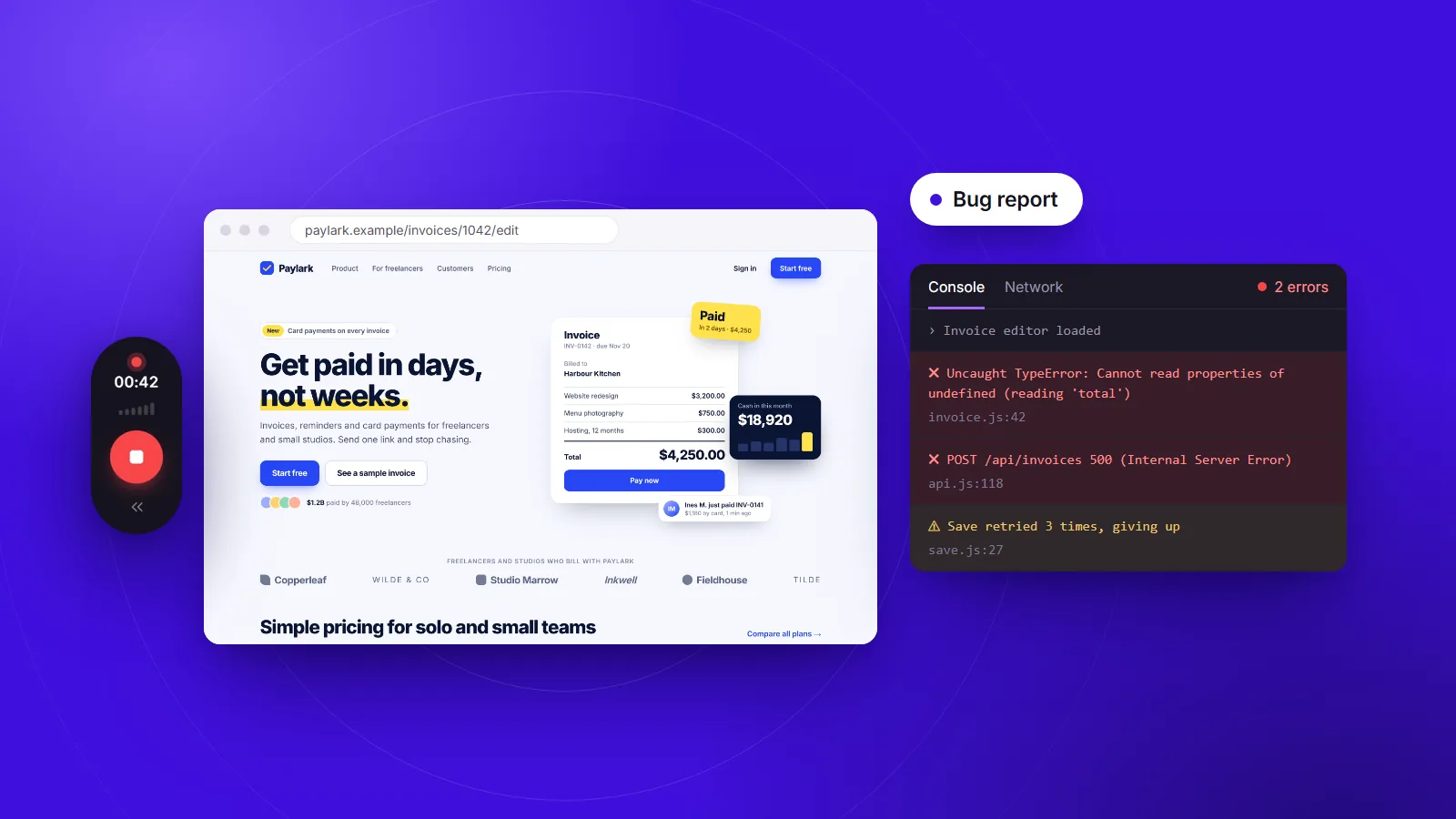
- A screen recording with the browser console open captures the steps, the timing and the error in one link.
- One bug per report, with a title that says what broke and where.
“It’s broken” is not a bug report. Neither is a paragraph describing what you remember seeing. By the time a developer reads it, half the context is gone (which browser, which steps, what the console said) and you are both in for a round of “can you send a screenshot?”
This guide shows you exactly what to include, gives you a bug report template you can paste into Jira, GitHub, Linear or a Word document, walks through a real example, and explains how a short screen recording turns a vague report into a one-link reproduction.
What is a bug report?
A bug report is a written (and ideally recorded) description of a software defect that gives a developer enough information to reproduce it, understand its impact and fix it. Its job is not to describe your frustration. Its job is to let someone who was not there see exactly what you saw.
What makes a good bug report?
Steps to reproduce ranked as the most helpful part of a bug report in a survey of developers from Apache, Eclipse and Mozilla, followed by stack traces and test cases. Inaccurate steps and missing information were the biggest obstacles to fixing bugs.
Source: Bettenburg et al., “What Makes a Good Bug Report?” (FSE 2008)The same research describes a mismatch: developers need precise, reproducible steps, while reporters tend to send descriptions and opinions. Every field below exists to close that gap.
The 8 parts of a good bug report
| Field | What to write | Example |
|---|---|---|
| Title | What broke, where, and when | “Save spins forever on the invoice edit page when the total is 0” |
| Summary | One or two sentences of context | “Editing a zero-total invoice can’t be saved, so free orders can’t be closed.” |
| Steps to reproduce | Numbered, starting from a fresh page load | 1. Log in as admin 2. Open any invoice 3. Set total to 0 4. Click Save |
| Expected result | What should have happened | “The invoice saves and the editor closes.” |
| Actual result | What happened instead | “The button spins for over 60 seconds; nothing saves.” |
| Environment | Browser and version, OS, device, account role, URL, app version | “Chrome 131, macOS 15, admin account, /invoices/123/edit” |
| Evidence | Screen recording, screenshot, console errors, failed requests | “Video link, plus: TypeError at invoice.js:42; POST /api/invoices returns 500” |
| Impact | Who is affected, how often, and any workaround | “Every zero-total invoice; no workaround.” |
If you cannot make it happen a second time, say so and note what you were doing. “Happened once, could not reproduce” is still useful, as long as it is honest.
Bug report template (copy and paste)
This plain-text template works in Jira, GitHub Issues, Linear, Asana, Google Docs and Word. Delete any line you truly cannot fill, but never the steps.
Title: [What broke] on [page or feature] when [condition]

Summary: [One or two sentences: what is wrong and why it matters]

Steps to reproduce:
1. [Starting point, e.g. log in as a standard user]
2. [Action]
3. [Action]
4. [The action that triggers the bug]

Expected result: [What should happen]
Actual result: [What happens instead]

Environment: [Browser + version], [OS], [device], [account or role], [URL], [app version]
Evidence: [Screen recording link], [screenshot], [console error text], [failed request]
Impact: [Who is affected, how often, workaround if any]
Bug report example: weak vs strong
“Invoices are broken, I can’t save anything. Please fix ASAP!!”
“Save spins forever on the invoice edit page when the total is 0. Steps: open any invoice, set the total to 0, click Save. Expected: saves. Actual: spinner for over 60 s, POST /api/invoices returns 500. Chrome 131, macOS 15, admin. Video: [link].”
The strong version takes about two minutes longer to write and saves the developer an hour of guessing, plus the back-and-forth asking for each missing detail. With a screen recording attached, most of it writes itself.
Why add a screen recording to a bug report?
Written steps describe what the reporter thinks they did. A recording shows what they actually did, including the step they did not know mattered: the double click, the back button, the slow network, the filter left on from yesterday.
- The exact sequence and timing. Race conditions and “it only fails the second time” bugs become visible.
- The console and network panels. With DevTools open, the red error and the failed request are on camera, which is usually where the fix starts.
- Narration of expected vs actual. Saying “I expected it to close, but it spun forever” while you click removes all ambiguity.
- No technical skill required. Customers, support agents and testers can all record a bug, even if they could never write a stack trace.
- One link in the ticket. The developer presses play instead of rebuilding the scene from a paragraph.
How to record a bug report video
- Open the browser consolePress F12 (or Cmd + Option + I on a Mac) and open the Console tab. Keep the Network tab one click away.
- Start recording the tab or screenRecord the tab for a web app, or the full screen if the bug involves more than one window.
- Reproduce from a clean startReload the page and do the steps at normal speed, exactly as you would write them down.
- Narrate expected vs actual“I click Save. I expect the editor to close. Instead it spins.” Say the URL and the account you are using.
- Paste the link, and the key facts as textDrop the video link into the ticket and still type the title, steps and error text, so the ticket stays searchable.
Use a test account, never record passwords or API keys, and blur any customer data before you share. Opivv’s editor can blur a region of the video in a few clicks.
For a detailed walkthrough with screenshots of each step, read how to record a bug report video with the console.
Common bug report mistakes (and the fix)
| Mistake | Fix |
|---|---|
| Several bugs in one ticket | One bug per report; link related ones |
| A title like “Bug” or “Not working” | What broke, where, and under which condition |
| Steps that start in the middle | Start from a fresh page load or login |
| Only a screenshot of the end state | A recording of the steps, or the steps written out |
| “Doesn’t work” as the actual result | Describe exactly what you saw: message, spinner, wrong value |
| No browser or account details | Browser and version, OS, role and URL, every time |
| Opinions about the cause | Facts first; label any guess as a guess |
Frequently asked questions
A specific title, a short summary, numbered steps to reproduce, the expected result, the actual result, the environment (browser, operating system, device, account and URL), evidence such as a screen recording or console errors, and the impact on users.
Sources
Written by the Opivv team. We build Opivv, a browser screen recorder people use for async updates, demos, bug reports and client reviews. Every statistic in this article links to its original source. First published . About us